


Field operations platform
One platform for your company's field operations
Run your workforce, shift rosters, security patrols, cleaning checklists, fleet trips and approvals across many sites from one dashboard. Attendance data is ready for payroll and client reports.
- Many branches and client sites
- Attendance from the phone browser and a QR kiosk
- Each company's data kept separate
Who it is for
For companies whose teams work in the field, spread over many sites.

Outsourcing companies
Outsourced staff at many client sites: rosters per site, attendance you can prove, and summaries for payroll and clients.

Security companies
Guards at client posts: patrols along QR checkpoints, a guest book, incident reports and monthly client reports.
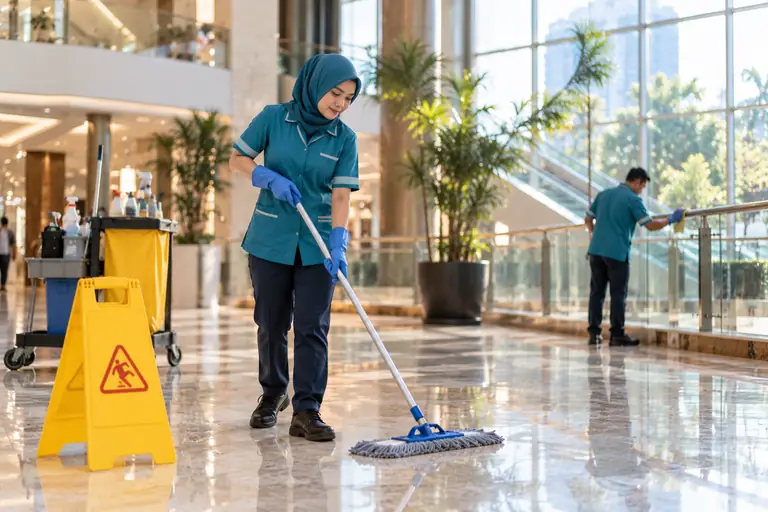
Facility and cleaning services
Cleaning and office-boy teams with daily photo checklists, supervisor inspections and attendance per building.

Multi-branch companies
Branches, warehouses or shops with an admin per branch, approval flows and attendance summaries for payroll.


What you can run
Start with Core, then add the modules your teams need. Every module uses the same employees, branches and sites.
- Core
Workforce and rosters
- Clock in and out from the phone browser with GPS and a site radius
- An office QR kiosk that keeps recording when the internet drops
- Fixed and rotating shifts, public holidays, leave, permits and overtime
- Attendance exceptions and corrections reviewed by supervisors
- Add-on module
Security
- Patrols along QR checkpoints
- Guest book at the guard post
- Incident reports with photos
- Guard shift handovers
- Add-on module
Facility
- Task templates for cleaning and office boys
- Assignments per date and site
- Checklists with before and after photos
- Supervisor inspections
- Add-on module
Fleet and trips
- Vehicles and business trips
- Odometer photos at the start and end of a trip
- Trip allowances, trip expenses and vehicle service
- Expense approval by the fleet admin
- Add-on module
Client portal
- Your clients see the personnel on duty at their sites today
- Attendance, schedules, patrols and incidents, as you choose to share
- Monthly PDF report on your letterhead
- Read-only, names and departments only, no other personal data
- Core
Approvals and control
- Multi-step approvals for leave, overtime, corrections and expenses
- Roles and access per branch
- An audit log of every data change
- Two-step sign-in
- Core
Reports and exports
- Payroll-ready attendance summaries per period, in Excel
- Monthly reports per site for clients: attendance, patrols, incidents, cleaning
- Print reports to PDF from the dashboard
Coming soon
- Outsourcing compliance: Fixed-term contracts and guard certificates (Gada Pratama, KTA), with reminders before they expire.
Explore the features
Each feature has its own page: the problem it solves, how it works and what it looks like in the app.
- Phone attendanceClock in from the phone browser with GPS and a work-site radius.Learn more
- QR kioskClock in with an ID card at an office tablet or laptop, also offline.Learn more
- Shift schedulingFixed and rotating shift patterns that build the roster for you.Learn more
- Security patrolsPatrols along QR checkpoints, incidents with photos, guest book, handovers.Learn more
- Cleaning & facilityScheduled tasks, before and after photos, supervisor inspections.Learn more
- Fleet & tripsTrips with odometer photos, allowances, expenses and service.Learn more
- ApprovalsMulti-step approvals for leave, overtime, corrections and expenses.Learn more
- Reports & payrollPayroll-ready attendance summaries and monthly client reports.Learn more
- Multi-branchBranches, client sites and admin access per branch in one dashboard.Learn more
Why WELGI
Many sites, separate data
One account for many branches and client sites. Each company's data is kept separate and visible only to its own users.
An ordinary Android phone is enough
Employees clock in from the phone browser without installing an app. The location is checked against the site radius.
The kiosk works offline
The office kiosk keeps attendance while the internet is down and sends it on its own once it is back.
Control and an audit trail
Access per role and branch, multi-step approvals, two-step sign-in and an audit log of every change.
Local support in Indonesian
Our team sets up your company and helps on WhatsApp during office hours (Western Indonesia Time).
How to start
Demo and setup
We walk you through it, then set up your company, branches, work sites with their radius, and your first admin.
Employees, rosters and modules
Add employees, build shift patterns, print ID cards for the kiosk and switch on the modules you need.
Run and review
Field teams clock in, patrol and complete checklists. Admins review exceptions and export summaries for payroll and clients.
Frequently asked questions
Do employees need to install an app?
No. Employees use the browser on their phone (Chrome or Safari). At the office they show their ID card to the QR kiosk.
Can one account run many branches and client sites?
Yes. Each branch has its own work sites, rosters and admins. Head-office admins see every branch, branch admins only their own.
What if the GPS signal is weak?
A phone clock-in is refused when the location accuracy is outside the limit, so no attendance is recorded at the wrong place. At the office, the kiosk does not rely on GPS.
Is a face photo required?
No. There is no face photo by default. A company can switch it on per site, with separate consent from each employee.
Can we choose the modules we need?
Yes. Core is always included. Security, Facility and Fleet and trips are switched on to match the work of your teams.
Where is the data stored?
In a data centre in Singapore, with access per role and an audit log. The details are in the Privacy Policy.
How much does it cost?
During the pilot, the price is agreed together based on the number of employees and modules. Message us on WhatsApp for a demo and an offer.
See how it works for your teams
Book a demo. We walk you through it with sample data and answer your questions.